Installing the Amstrad CPC start-up libraries Install the Small Devices C Compiler to C:sdcc. Make sure the correct search paths are set up. Refer to the install.txt in the SDCC directory!
Get HEX2BIN.EXE (attached to this mail) and put it somewhere in the search path (e.g. put it in windowscommand or similar) Copy crt0.o to
C:sdcclibz80 Copy putchar.o to C:sdcclibz80 Make a new directory c:cpctest where to put the hallo world source code. /* Amstrad CPC Hello world example*/
#include
void main(void)
{
printf( “C on Amstrad”);
}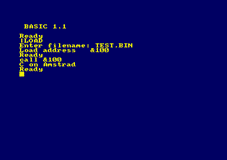 Compile the contents by running the compiler, pre-processor and linker in one go by typing: sdcc –mz80 hello.c This results in a file(among others) called hello.ihx Convert hello.ihx to a binary file by running hex2bin: hex2bin hello.ihx hello.bin is now ready to be tested on a CPC or in an emulator.... Put the hello.bin in a .dsk file, using the cpcxfs application. On the emulator the file must be loaded from address &100. This can be done using Utopias |LOAD command. The execution address is &100. Just type call &100 and the result should be a “C on Amstrad” displayed on the screen. The program will
return to the prompt. Examine the program with the |DI (Maxam) command :-) ... That's it... This process can be automated by using the Crimson editor or other similar editor... for fast compiling. (find it on www.genesis8bit.com) As show on the previous page in order to make a minimal binary able to execute on the Amstrad you need to write the initial runtime library! Its called “crt0.s” and needs to be modified in order to run on the CPC! All other libraries will be linked to this library!... Once this has been
understood it should be quite easily to adapt crt0.o to other Z80 based Amstrad computers like the NC100/200/PCW and the PDA600 or even
the infamous (but not less interesting) alternative OS called FutureOS! ;; FILE: crt0.s;; Generic crt0.s for a Z80
;; From SDCC..
;; Modified to suit execution on the Amstrad CPC!
;; by H. Hansen 2003
;; Original lines has been marked out!
.module crt0
.globl _main
.area _HEADER (ABS)
;; Reset vector
.org 0x100 ;; Start from address &100
jp init
.org 0x110
init:
;; Stack at the top of memory.
;; ld sp,#0xffff
;; I will use the Basic stack, so the program can return to basic!
;; Initialise global variables
call gsinit
call _main
jp _exit
; Ordering of segments for the linker.
.area _HOME
.area _CODE
.area _GSINIT
.area _GSFINAL
.area _DATA
.area _BSS
.area _HEAP
.area _CODE
__clock::
ret
_exit::
ret
.area _GSINIT
gsinit::
.area _GSFINAL
ret ;; FILE: putchar.s
;; Modified to suit execution on the Amstrad CPC
;; by H. Hansen 2003
;; Original lines has been marked out!
.area _CODE
_putchar::
_putchar_rr_s::
ld hl,#2
add hl,sp
ld a,(hl)
call 0xBB5A
ret
_putchar_rr_dbs::
ld a,e
call 0xBB5A
retUsing additional CPC specific librariesTo achieve minimal IO it is also necessary to adapt the putchar.s to the CPC specific environment! This is a quick muck up! Using the slow
firmware of the CPC! (Eg. printf will use the putchar.s) I have made two simple libraries that utilise CPC firmware routines: AMSGRAPH.H - Drawing CONIO.H - The CPC version of CONIO used in the C64 OS contiki! To use this in own programs copy the .h files to the c:sdccinclude directory and the .o files to the c:sdcclibz80 directory. After this edit the file z80.lib in c:sdcclibz80 and append two lines: conio.o and amsgraph.o at the end. Now the functions can be used by including them in own programs: /* Amstrad CPC Drawing example*/
#include
void main(void)
{
draw(320,200);
}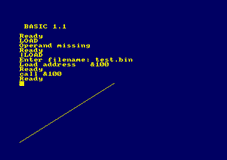 /* Amstrad CPC Drawing example*/
#include
void main(void)
{
clrscr();
cputs( “Hello world”);
}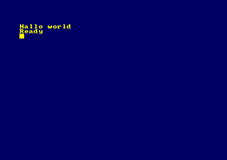 Using the assembler in SDCC It is easy to embed assembler direct in C programs: /*Using Z80 assembler in SDCC*/#include
void modetwo();
void main(void)
{
modetwo();
}
void modetwo()
{
_asm
ld a,#2
call 0xBC0E
_endasm;
}There is also another approach in using assembler in C… this is to write entire libraries in assembler and calling functions from your program.This program simply sets the mode 2 screen! Writing own libraries in assembler Parameters to a function is passed on the stack in the following manner: The function: void myfunc(int a, unsigned char b) Parameters in this case are passed as value copies on the stack. A call the
myfunc(1000,100) will result in the following stack, when entering the function. | STACK | SP | SP+1 | SP+2 | SP+3 | SP+4 | | Meaning | Return address LSB | Return address MSB | Parameter 1 value copy LSB | Parameter 1 value copy MSB | Parameter 2 value copy LSB | | Value | | | &E8 | &03 | &64 |
To put this function into a library – make two files: mylib.h and mylib.s: The header file for including: /*FILE:mylib.h
Contains prototypes for mylib.h */
void myfunc(int a, unsigned char b);
And the assembler file:
; FILE: mylib.s
.globl _myfunc
;void myfunc(int a, unsigned char b);
;Just an example on how parameter passing works – does not do anything to the values!
_myfunc::
ld hl,#2
add hl,sp
ld e,(hl)
ld hl,#3
add hl,sp
ld d,(hl)
ld hl,#4
add hl,sp
ld a,(hl)
; Do something with DE(=a) and A(=b)
;
; etc. etc.
ret
;PUT more function here ... Look in the amsgraph.h and conio.h for more practical
;examplesas-z80 –glopff –o mylib mylib.sNow put the .h file in the c:sdccinclude directory and assemble the mylib.s file by typing:Rename the mylib.asm to my mylib.o and put the .o file in the c:sdcclibz80 directory. Append the line mylib.o in the z80.lib file.
Now the library and its function(s) can be used by including the ordinary way.
Pointers as parameters are passed as reference copies on the stack!
Return values are returned in the HL register... Eg.: /*FILE:mylib.h
Contains prototypes for mylib.h */
unsigned char myfunc1();
And the assembler file:
; FILE: mylib.s
.globl _myfunc1
;unsigned char myfunc1();
_myfunc1::
; Always returns the contents of the r register
ld a,r
ld l,a retExamples Thats it. ;*****************************************************************************/
; AMSGRAPH.S - A small graphics library for the Amsrad CPC
; For use with the Small Devices C Compiler
;
; (c) 2003 H. Hansen
;*****************************************************************************/
;
;Functions:
;void draw(int x, int y)
;void plot(int x, int y)
;void move(int x, int y)
;void gpen(unsigned char pencolor)
;unsigned char getgpen(void)
.globl _draw
;void draw(int x, int y);
;Draws a line from the current graphics curser position to coordinates x,y
_draw::
ld hl,#2
add hl,sp
ld a,(hl)
ld e,a
ld hl,#3
add hl,sp
ld a,(hl)
ld d,a
ld hl,#4
add hl,sp
ld a,(hl)
ld c,a
ld hl,#5
add hl,sp
ld a,(hl)
ld b,a
ld h,b
ld l,c
call 0xBBF6 ; GRA LlNE ABSOLUTE
ret
.globl _plot
;void plot(int x, int y)
;Plot a point on x,y int the current graphics color!
_plot::
ld hl,#2
add hl,sp
ld a,(hl)
ld e,a
ld hl,#3
add hl,sp
ld a,(hl)
ld d,a
ld hl,#4
add hl,sp
ld a,(hl)
ld c,a
ld hl,#5
add hl,sp
ld a,(hl)
ld b,a
ld h,b
ld l,c
call 0xBBEA ; GRA PLOT ABSOLUTE
ret
.globl _gpen
;void gpen(unsigned char pencolor)
;Sets the graphics pen!
_gpen::
ld hl,#2
add hl,sp
ld a,(hl)
call 0xBBDE ; GRA SET PEN
ret
.globl _getgpen
;unsigned char getgpen(void)
;Returns the used graphics pen
_getgpen::
call 0xBBE1 ; GRA GET PEN
ld l,a
ret
.globl _move
;void move(int x, int y)
;Moves the graphic curser to coordinates x,y
_move::
ld hl,#2
add hl,sp
ld a,(hl)
ld e,a
ld hl,#3
add hl,sp
ld a,(hl)
ld d,a
ld hl,#4
add hl,sp
ld a,(hl)
ld c,a
ld hl,#5
add hl,sp
ld a,(hl)
ld b,a
ld h,b
ld l,c
call 0xBBC0 ; GRA MOVE ABSOLUTE
ret/* A Graphics library for the AMSTRAD CPC range of computers
Uses firmware to realize graphics output..
2003 H. Hansen
*/
#ifndef __amsgraph_h__
#define __amsgraph_h__
void draw(int x, int y);
void plot(int x, int y);
void move(int x, int y);
void gpen(unsigned char pencolor);
unsigned char getgpen(void);
#endif /* __amsgraph_h__ */;*****************************************************************************/
; CONIO.S - Amstrad CPC version of the Contiki conio.h (derived from borland C)
; To use with the Small Devices C Compiler
;
; 2003 H. Hansen – This file is not debugged in any way!
;*****************************************************************************/
; void clrscr (void);
; Clear the whole screen and put the cursor into the top left corner
; TESTED
.globl _clrscr
.area _CODE
_clrscr::
ld a,#1
call 0xBC0E ; SCR SET MODE
ret
; unsigned char kbhit (void);
; Return true if there's a key waiting, return false if not
; TESTED
.globl _kbhit
_kbhit::
call 0xBB09 ; KM READ CHAR
ld l,#1
ret c
ld l,#0
ret
; void gotox (unsigned char x);
; Set the cursor to the specified X position, leave the Y position untouched
.globl _gotox
_gotox::
ld hl,#2
add hl,sp
ld a,(hl)
call 0xBB6F ; TXT SET COLUMN
ret
; void gotoy (unsigned char y);
; Set the cursor to the specified Y position, leave the X position untouched
.globl _gotoy
_gotoy::
ld hl,#2
add hl,sp
ld a,(hl)
call 0xBB72 ; TXT SET ROW
ret
; void gotoxy (unsigned char x, unsigned char y)
; Set the cursor to the specified position
.globl _gotoxy
_gotoxy::
ld hl,#2
add hl,sp
ld a,(hl)
ld b,a
ld hl,#3
add hl,sp
ld a,(hl)
ld l,a
ld h,b
call 0xBB75 ; TXT SET CURSOR
ret
; unsigned char wherex (void);
; Return the X position of the cursor
.globl _wherex
_wherex::
call 0xBB78 ; TXT GET CURSOR
ld ; l,h
ret
; unsigned char wherey (void);
; Return the Y position of the cursor
.globl _wherey
_wherey::
call 0xBB78 ; TXT GET CURSOR
ret
; void cputc (char c);
; Output one character at the current cursor position
.globl _cputc
_cputc::
ld hl,#2
add hl,sp
ld a,(hl)
call 0xBB5A ; TXT OUTPUT
ret
; void cputcxy (unsigned char x, unsigned char y, char c)
; Same as "gotoxy (x, y); cputc (c);"
.globl _cputcxy
_cputcxy::
ld hl,#4
add hl,sp
ld e,(hl)
ld hl,#2
add hl,sp
ld a,(hl)
ld b,a
ld hl,#3
add hl,sp
ld a,(hl)
ld l,a
ld h,b
call 0xBB75 ; TXT SET CURSOR
ld a,e
call 0xBB5A
ret
; void cputs (const char* s);
; Output a NUL terminated string at the current cursor position
; TESTED
.globl _cputs
_cputs::
ld hl,#2
add hl,sp
ld e,(hl)
ld hl,#3
add hl,sp
ld d,(hl)
cputs$:
ld a,(de)
cp #0
ret z
call 0xBB5A
inc de
jr cputs$
; void cputsxy (unsigned char x, unsigned char y, const char* s);
; Same as "gotoxy (x, y); puts (s);"
; TESTED
.globl _cputsxy
_cputsxy::
ld hl,#4
add hl,sp
ld d,(hl)
ld hl,#5
add hl,sp
ld e,(hl)
ld hl,#2
add hl,sp
ld a,(hl)
ld b,a
ld hl,#3
add hl,sp
ld a,(hl)
ld l,a
ld h,b
call 0xBB75 ; TXT SET CURSOR
jr cputs$
; int cprintf (const char* format, ...);
; Like printf, but uses direct screen I/O
; int vcprintf (const char* format, va_list ap);
; Like vprintf, but uses direct screen I/O
; char cgetc (void);
; Return a character from the keyboard. If there is no character available,
; the functions waits until the user does press a key. If cursor is set to
; 1 (see below), a blinking cursor is displayed while waiting.
; TESTED
.globl _cgetc
_cgetc::
call 0xBB18
ld l,a
ret
; unsigned char cursor (unsigned char onoff);
; If onoff is 1, a cursor is display when waiting for keyboard input. If
; onoff is 0, the cursor is hidden when waiting for keyboard input. The
; function returns the old cursor setting.; unsigned char revers (unsigned char onoff);
; Enable/disable reverse character display. This may not be supported by
; the output device. Return the old setting.
; TESTED
.globl _revers
_revers::
ld a,(oldset$) ; old on/off setting
ld d,a
ld hl,#2
add hl,sp
ld a,(hl) ; parameter
cp d
jr nz,revaction$
ld l,d ; return old setting
ret
revaction$:
push af
call 0xBB9C ; TXT INVERSE
pop af
ld (oldset$),a
ld l,d
ret
oldset$:
.db #0
; unsigned char textcolor (unsigned char color);
; Set the color for text output. The old color setting is returned..globl _textcolor
_textcolor::
ld hl,#2
add hl,sp
ld a,(hl)
ld d,a
call 0xBB93 ; TXT GET PEN
ld e,a
ld a,d
call 0xBB90 ; TXT SET PEN
ld l,e
ret
; unsigned char bgcolor (unsigned char color);
; Set the color for the background. The old color setting is returned. */
.globl _bgcolor
_bgcolor::
ld hl,#2
add hl,sp
ld a,(hl)
ld d,a
call 0xBB99 ; TXT GET PAPER
ld e,a
ld a,d
call 0xBB96 ; TXT SET PAPER
ld l,e
ret
; unsigned char bordercolor (unsigned char color);
; Set the color for the border. The old color setting is returned.
.globl _bordercolor
_bordercolor::
ld hl,#2
add hl,sp
ld a,(hl)
push af
call 0xBC3B ; SCR GET BORDER
pop af
ld d,b
ld b,a
ld c,a
push de
call 0xBC38 ; SCR SET BORDER
pop de
ld l,d
ret
; void chline (unsigned char length);
; Output a horizontal line with the given length starting at the current
; cursor position.
.globl _chline
_chline::
ld hl,#2
add hl,sp
ld a,(hl)
cp #0
ret z
ld b,a
ld a,#154
chlineloop$:
call 0xBB5A
djnz chlineloop$
ret
; void chlinexy (unsigned char x, unsigned char y, unsigned char length);
; Same as "gotoxy (x, y); chline (length);"
; TESTED
.globl _chlinexy
_chlinexy::
ld hl,#2
add hl,sp
ld d,(hl)
ld hl,#3
add hl,sp
ld e,(hl)
ld hl,#4
add hl,sp
ld a,(hl)
cp #0
ret z
ld b,a
ld h,d
ld l,e
call 0xBB75
ld a,#154 ; Horizontal line char.
chxyloop$:
call 0xBB5A ; TXT OUT
djnz chxyloop$
ret
; void cvline (unsigned char length);
; Output a vertical line with the given length at the current cursor
; position.
.globl _cvline
_cvline::
ld hl,#2
add hl,sp
ld a,(hl)
cp #0
ret z
ld b,a
call 0xBB78 ; TXT GET CURSOR
ld a,#149 ; Vertical line char
cvloop$:
inc ;l
call 0xBB75
call 0xBB5A
djnz cvloop$
ret
; void cvlinexy (unsigned char x, unsigned char y, unsigned char length);
; Same as "gotoxy (x, y); cvline (length);"
.globl _cvlinexy
_cvlinexy::
ld hl,#2
add hl,sp
ld d,(hl)
ld hl,#3
add hl,sp
ld e,(hl)
ld hl,#4
add hl,sp
ld a,(hl)
cp #0
ret z
ld b,a
ld h,d
ld l,e
call 0xBB75 ; TXT SET CURSOR
ld a,#149 ; Vertical line char
cvxyloop$:
inc l
call 0xBB75
call 0xBB5A
djnz cvxyloop$
ret
; void cclear (unsigned char length);
; Clear part of a line (write length spaces).
.globl _cclear
_cclear::
ld hl,#2
add hl,sp
ld b,(hl)
ld a,#20 ; White space
cclearloop$:
call 0xBB5A
djnz cclearloop$
ret
; void cclearxy (unsigned char x, unsigned char y, unsigned char length);
; Same as "gotoxy (x, y); cclear (length);"
.globl _cclearxy
_cclearxy::
ld hl,#2
add hl,sp
ld d,(hl)
ld hl,#3
add hl,sp
ld e,(hl)
ld hl,#4
add hl,sp
ld b,(hl)
ld h,d
ld l,e
call 0xBB75
ld a,#20 ; White space
cclearxyloop$:
call 0xBB5A
djnz cclearxyloop$
ret
; void screensize (unsigned char* x, unsigned char* y);
; Return the current screen size.
.globl _screensize
_screensize::
ld hl,#2
add hl,sp
ld d,(hl)
ld hl,#3
add hl,sp
ld e,(hl)
ld a,#40 ; X Size
ld (de),a
ld hl,#4
add hl,sp
ld d,(hl)
ld hl,#5
add hl,sp
ld e,(hl)
ld a,#25 ; Y Size
ld (de),a
ret
; void cputhex8 (unsigned char val);
; void cputhex16 (unsigned val);
; These shouldn't be here...Hans Hansen
| ★ AMSTRAD CPC ★ A voir aussi sur CPCrulez , les sujets suivants pourront vous intéresser... |
|
|












