All this and Maxam II... Maxam II, others nil. That's Peter Green's verdict on the new discbased development system from utility experts Arnor. As my fan (hi, Mum) has probably noticed, I have a great fondness for Arnor's Maxam assembler/Protext editor combination. It has been used to write and test all the programs in my Assembly Point series, as well as commercial programs on the CPC and PCW computers (the latter by generating the machine code on a CPC as a CP/M .COM file which can then be run directly on the 8256), and Spectrum machine code programs ported across on tape using ZXSAVER, the reverse routine to my ZXLOADER published in an earlier issue of ACU. I mentioned in one comparative review at the time of release that I had bought Maxam rather than use a rival product sent free for review. The Shaggy Softwareperson who haunts the pages elsewhere in this mag is also a Maxam enthusiast, but as he pointed out a few months ago, it isn't all it could be. His main complaints, which I echo, were that Maxam has no proper monitor for debugging machine code programs, and that the disassembler text files cannot feed the assembler. Now, after a lengthy period during which Arnor has been occupied with PCW versions of the Protext suite, a C compiler and BCPL, comes the product assembler freaks have so long been panting for - the Maxam II development system.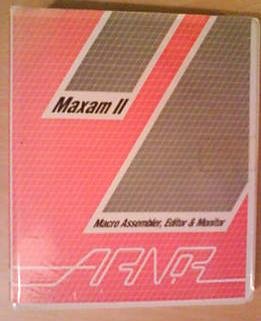 It goes a long way to fixing all the deficiencies of Maxam and provides an excellent set of tools for writing, assembling and debugging Z80 machine code. It goes a long way to fixing all the deficiencies of Maxam and provides an excellent set of tools for writing, assembling and debugging Z80 machine code. CP/M+ only Maxam II is supplied as a fat ring binder containing the 157 loose leaf pages of the manual and a 3in master disc in a plastic pocket. The product runs under CP/M + only, so it is only suitable for use on the CPC 6128 or PCW 8256/8512. On the 6128 it cannot be used to debug programs that are intended to run as expansion roms or under Amsdos or tape - sorry, 464 and 664 owners, you need read no further. Also both the large and small versions of the monitor are bigger than the 16k of a CPC expansion rom, so it would be a major project to add the software to Arnor's CPC ROM range. When I spoke to Arnor I was effectively told that they'd like to do it but not to hold my breath waiting. As always with disc software, the first thing you do is make working discs from the master, which is then hidden away safely. The instructions in the manual describe how to make Start-of-day, Maxam LARGE and Maxam SMALL discs. In the case of PCWs or 6128s with two disc drives, this is almost completely automated by using EXEC files. Such a disc allows a CP/M+ cold boot to automatically load and enter APED, the Arnor Program EDitor. The assembler and monitor functions can be called from within APED, which first saves its current state on disc for later retrieval. This means you can be writing one program, stop and assemble a second program, then debug a third, and finally return to the first job without having to type a single LOAD or SAVE. APED handles everything itself using temporary files, although this only works completely transparently if you have sufficient disc space to hold all the files at once. Otherwise you'll have to do a lot of disc shuffling. The temporary files are the ones that appear with names such as APED.$V$, APED.STS and APED.1. What the manual doesn't mention anywhere, and should, is which of the files on the master disc do what.
The working discs for the monitor are simply disc copies of each side of the master, which include a lot of stuff you don't need and consequently waste workspace. 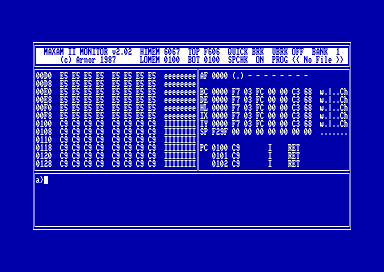
Figure I: The front panel
So, for the record, the text editor APED uses APED.COM and APED.HLP. The assembler is MA.COM, the large monitor uses MM.COM, MM.COD, MM.DAT and MM.HLP, while the small monitor uses MSM.COM, MSM.COD, MSM.DAT and MM.HLP. More disc space can be obtained by deleting the help files, (extension .HLP), in which case you lose the onscreen help messages. The first stage in producing a piece of machine code is to write the source code, for which purpose APED is provided. This is essentially the same as PROG mode in Protext; that is, there's no word-wrapping, rulers, or other purely wordprocessing features. Lines may be wider than the screen, and trying to type over the right edge of the screen causes the text to shift half-a-screen to the left rather than force a carriage return. The editor has two modes: edit for typing the text in and command for executing the various functions. You flip between the two using the Esc key.
Screen response is fast, and a multitude of cursor movement commands (by character, word, line, screen or to either end of the text) make editing quick and easy. Numbered markers can be embedded in the text, so you can jump around without losing your place. Search extended Single blocks of text can be marked, and moved or deleted. The search-and-replace function has been extended. To the existing options such as global or not, case-sensitive or not, automatic replacement or not, has been added "find nth occurrence", where n is a number 1 to 255. As the example in the manual shows, searching for " using options G2 (global search for every second occurrence) ensures that all quotes in a piece of text come in pairs. Unfortunately, you still can't do search-and-replace within a marked block of text. This would be a very useful facility for programs that use a number of similar subroutines - like triangle_l and triangle_2 in this month's Assembly Point. It would have saved time if I could have written and debugged the triangle_l routine, marked it as a block, duplicated it, then done a block search-and-replace to alter all the label references from 1 to 2. Instead I had to change them by hand, which can be dangerous if you miss any (especially in a case such as JP Z,loop2 staying as JP Z,loopl - this will assemble correctly but follow a completely wrong path when you run it).
I've mentioned this point to Arnor and the company's policy of continual product improvement (the review APED is already version 2.05) means that it may well appear on later releases. One good improvement is that if you make a mistake typing a command line you can now move the cursor and fix the error - the old Protext would only allow you to delete back to the mistake and retype. The most annoying thing is that some of the keystrokes I know instinctively from the CPC ROM Protext, are different in APED. For example, Control-A, which deletes a line on the ROM version, is used in APED for a new function, swap adjacent characters (lets you correct typing to typing with one keystroke). Perilous Line delete for APED is Control-Clr, used on ROM Protext to move a block of text! This one change alone has potential for causing real grief. Arnor say that the APED control keys were chosen for best use of the PCW keyboard, and the 6128 keys had to follow suit. As a 6128 user, I say -**!*!#$&**! One final point, APED allows you to have files larger than the computer's available memory, the only limit on file sizes being the amount of storage available on the discs. As Arnor points out though, large files are not necessarily a good way to work on a program source file. It's certainly quicker to work with a lot of small files. The assembler is pretty much the same as my beloved Maxam I, but the added features make even more of a winner. The most striking addition is that Maxam II is a macro assembler. Macros are a system in which you define new assembler instructions, which you can use as if they were proper microprocessor op codes. On assembly, each occurrence of a macro name is replaced by the corresponding sequence of instructions you have defined. You can also pass parameters, as in this example: - MACRO EX-REG $reg1 $reg2 ;define a nacro called EX-REG using tyo
- ;paraneters
- PUSH $reg1 ;push registers on stack
- PUSH $reg2
- POP $reg1 ;pop them off in the opposite order
- POP $reg2
MEND ;nacro definition endsIf your source code reads: then the actual machine code generated is as if you had actually typed:- PUSH HL
- PUSH BC
- POP HL
- POP BC
- PUSH IX
- PUSH DE
- POP IX
- POP DE
See? Your source code becomes shorter and easier to read and understand, but you should always check you really need a macro and not just a subroutine, otherwise the object code can grow to a ridiculous size.Further useful additions to the list of assembler directives are STR (same as TEXT, but sets the top bit of the last letter automatically). Thus in Assembly Point this month .the listing could read: STR "TRIANGLE" instead of: TEXT "TRIANGL","E"+&80 More advanced conditional assembly is allowed, using REPEAT . . . UNTIL. As well as linking several source files together at assembly time by using the READ directive (which scans several separate text files held on disc), Maxam II can link assembled modules together using the SYM and LINK directives.
The catch is that code to be linked must be relocatable, which is a whole new can of Babelfish. Real clever clogs can also link assembler modules with Arnor C programs. The examples I've seen of C source code make programming in Serbo-Croat look easy. (Query - aren't high level languages supposed to be easier to read than assembler?) Watching the Defectives Finally we come to the third and newest part of the Maxam II package -the monitor, which lets you watch all your mistakes unfold on the screen.
This really is a cracking bit of software, the only disadvantage being that it takes up a fair bit of user RAM itself. That's why Arnor supplies two versions on different sides of the master disc - a fully-featured version and a stripped-down version for use when memory is tight.
The diagram shows how the "front panel" is laid out. The real business takes place in the three larger windows. Of the two squarish ones in the centre of the screen, the lefthand one either displays a list of memory locations pointed to by a variable called MP (memory pointer) in hex and Ascii, or a disassembly of those locations (confusingly, the manual calls the disassembly mode "Ascii mode"). The righthand window is the register window, which displays the contents of the main (not alternate) register set, the states of the flags, the stack pointer and program counter. Also, each of the 16 bit registers has a list beside it, in hex and Ascii, of the contents of memory starting at the address in the register. This means that, when using 16 bit registers as pointers to memory, you can see, not only the address pointed to, but what's actual at that address. The contents of the stack are similarly displayed, while against the PC (program counter) you have a disassembly of the op-codes in that area. The monitor allows you to load and run a program to be debugged while watching the effect of the instructions on memory, registers and flags - all while remaining in complete control of the machine. This is called single-stepping a program. Maxam II can do much more, though. You can stop at any point, change values in any or all of the registers, and carry on where you left off. You can
check for special conditions by setting what are called "conditional breakpoints". For example, you can tell the monitor to run the program at full speed until the BC register contains zero and the HL register contains &C000. then stop. This is invaluable for trapping all sorts of obscure bugs.
Other types of error checking can be used, such as issuing a warning if the stack is going to overflow, if a warm boot is attempted, and so on.
Some readers may be wondering how the monitor is able to keep control of the computer while running a bugged program when it should cause a crash. The answer is that the code is not run directly on the chip in the machine, but is simulated on a software version of the Z80.
This makes execution slower (no bad thing when debugging) and means that the monitor, not the faulty program, is actually in charge of the computer. It is possible to crash the monitor, but it isn't easy. Manual labour The only thing that lets down an otherwise excellent product is the manual. Before Arnor reaches for the phone let me say that it's a lot better than many other manuals, but you really have to dig for some of the information, even with an index. You can disassemble an object file to disc, but looking up all the entries under Disassemble in the index won't tell you how. In fact you use SPOOL to copy all screen output to a disc text file, then use FD to disassemble a disc file. And it STILL isn't a form that assembler can cope with. Arnor is considering my suggestion to use up part of the 25k that's still free on the master disc with a Hairy Hacker-type filter program to fix this.
In conclusion, despite one or two dis-. appointments, Arnor has yet again delivered the goods. This is a really excellent piece of software which, given the speed with which debugging can be done, will pay its way very quickly even at a price of £79.95. This assumes you're serious about software development under CP/M+, of course - there's nothing here for 464 664 owners, who will have to wait and see whether anything tumbles from Arnor's sleeve in the future. Peter Green , ACU #8706
|