Last month we published a 464 to 6128 converter. This month Gary has produced a much smaller routine which implements the most important commands.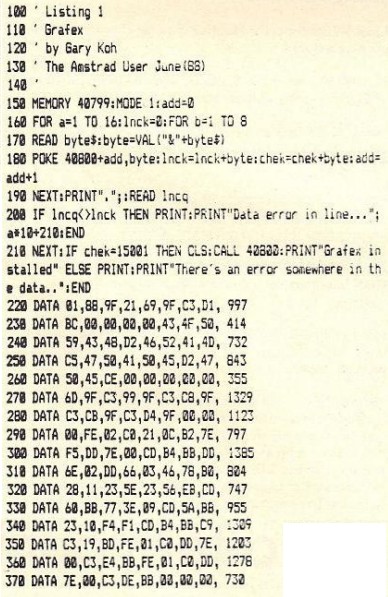 6128 owners have been spoilt by having a large range of graphics commands. To put this right I have produced the following program. This program will add 4 new graphics commands that are normally on the 6128 on to the 464. The new commands are implemented as RSX's. The only commands I have not implemented are the Mask and Fill command. Fill routines will be dealt with later. Mask is tricky too and is not frequently used so I have not bothered with it. The new commands are Copychr, Frame, Gpaper and Gpen. Explanations of the parameters and what each command does is detailed below the listing. The 6128 syntax of each command is a$=Copychr$(s), Frame, Graphics paper p and Graphics pen p. All you have to do now with programs that use these commands is to change the syntax. I hope this is of use to you. |Copychr,@a$,s -This command allows you to road characters from the screen. The 's'parameter is the value for which stream you want to read a character. 'a$' MUST be at least one character long. Strange things will probably happen if you pass a null string (eg. system reset). This command has been slightly extended on the 464. Normally it will read only one character but if you make aS four characters long then it will read four characters from the screen, eg. LOCATE 1,1:a$="iiiii":|COPYCHR,@a$,0:LOCATE 1,10:PRINT a$ (This will copy 5 characters from location (1,1), then print them at location (1,10)) NOTE: This routine will not work with the CPC664 or CPC6128). |Frame - This will cause a frame flyback to occur. This can be utilized to produce smooth animation. |Gpaper,p - This will set the value of the graphics paper. The graphics paper is the background of characters printed at the graphics cursor and the colour the graphics screen is cleared to. |Gpen,p -This will set the value of the graphics pen. The graphics pen is the colour that lines or points are drawn in. TAU
|