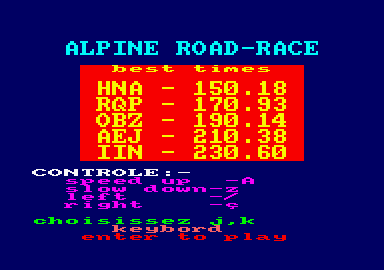 
Race across open grassy plains, over great lakes, through the impenetrable darkness of a tunnel and, finally, over sparse desert-lands in the greatest race ever held on your Amstrad. Hear the pitch of the engine change as you accelerate and wrestle with your joystick as you overtake the other roadhogs on your stretch of road.
You've guessed it — Alpine Road-Race is a perspective car race game which gets its name from the traditional mountain range on the horizon. Although predominantly Basic, the game runs extremely quickly and
without "flickers" due to using machine code for the time-consuming multicolour graphics and the machine's flashing colour facility. This is a powerful feature that is often overlooked by Basic programmers trying to animate their programs. To enter the program into your machine, follow these steps;
- Type in and run listing 1 — the Hex-loader.
- Enter the information from listing 2. To save typing, the Tab key has been defined to give a row of zeros.
- When all of the data has been entered, the loader will save the code. Save this somewhere well after the start of the tape — at least 40 on the counter.
- Type in and save listing 3 before the machine code on the tape.
- Rewind the tape and RUN" the program in.
On running, the title screen will come up with some random best times. Two lines from the bottom of the screen, the current control method will be shown. This can be changed by pressing either J or K. Enter will start the game.When the game starts, there will be two cars near the bottom of the screen. Yours is the higher of the two. If you collide with either of the other cars or steer yours off of the road, your car will explode and your game will end. If, however, you survive until the end of the desert stage, you will be congratulated and the computer will play a tune. If your time is good enough, you will be asked to enter your name for the best timetable. Conversion to disc: Alter line 2130 to — 2130 MEMORY &807F:LOAD"!ALPCODE",&8080 etc. Your Computer
|













